快速自动门控配置
目标
这个示例演示了 EagerGateScheduleConfigurator 如何在简单网络中设置调度。
INET version: 4.4
Source files location: inet/showcases/tsn/gatescheduling/eager
模型
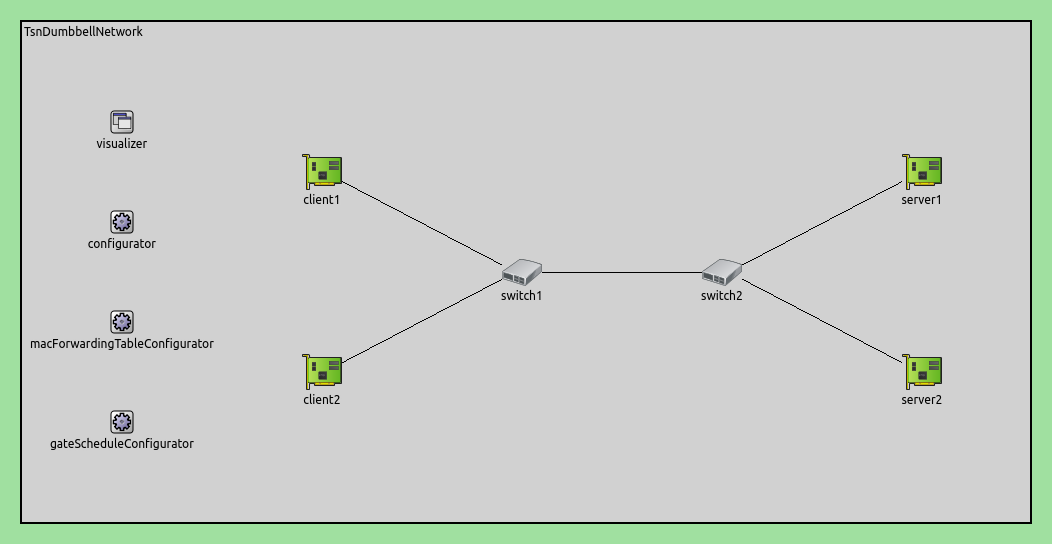
仿真网络结构如下:
配置如下:
[Eager]
network = inet.networks.tsn.TsnDumbbellNetwork
description = "Eager gate scheduling"
sim-time-limit = 0.2s
#record-eventlog = true

# 配置交换机类型
*.switch1.typename = "TsnSwitch1"
*.switch2.typename = "TsnSwitch2"

# 客户端应用配置
*.client*.numApps = 2
*.client*.app[*].typename = "UdpSourceApp"
*.client*.app[0].display-name = "best effort"
*.client*.app[1].display-name = "video"
*.client*.app[0].io.destAddress = "server1"
*.client*.app[1].io.destAddress = "server2"
*.client1.app[0].io.destPort = 1000
*.client1.app[1].io.destPort = 1002
*.client2.app[0].io.destPort = 1001
*.client2.app[1].io.destPort = 1003
*.client*.app[*].source.packetNameFormat = "%M-%m-%c"
*.client*.app[0].source.packetLength = 1000B
*.client*.app[1].source.packetLength = 500B
*.client*.app[0].source.productionInterval = 500us # ~16Mbps
*.client*.app[1].source.productionInterval = 250us # ~16Mbps

# 服务器应用配置
*.server*.numApps = 4
*.server*.app[*].typename = "UdpSinkApp"
*.server*.app[0..1].display-name = "best effort"
*.server*.app[2..3].display-name = "video"
*.server*.app[0].io.localPort = 1000
*.server*.app[1].io.localPort = 1001
*.server*.app[2].io.localPort = 1002
*.server*.app[3].io.localPort = 1003

# 启用出站流
*.client*.hasOutgoingStreams = true

# 客户端流识别
*.client*.bridging.streamIdentifier.identifier.mapping = [
    {stream: "best effort", packetFilter: expr(udp.destPort == 1000)},
    {stream: "video", packetFilter: expr(udp.destPort == 1002)},
    {stream: "best effort", packetFilter: expr(udp.destPort == 1001)},
    {stream: "video", packetFilter: expr(udp.destPort == 1003)}
]

# 客户端流编码
*.client*.bridging.streamCoder.encoder.mapping = [
    {stream: "best effort", pcp: 0},
    {stream: "video", pcp: 4}
]

# 启用流
*.switch*.hasIncomingStreams = true
*.switch*.hasOutgoingStreams = true

*.switch*.bridging.streamCoder.decoder.mapping = [
    {pcp: 0, stream: "best effort"},
    {pcp: 4, stream: "video"}
]

*.switch*.bridging.streamCoder.encoder.mapping = [
    {stream: "best effort", pcp: 0},
    {stream: "video", pcp: 4}
]

# 启用入站流
*.server*.hasIncomingStreams = true

# 启用出口流量整形
*.switch*.hasEgressTrafficShaping = true

# 带有2个队列的时域感知流量整形
*.switch*.eth[*].macLayer.queue.numTrafficClasses = 2
*.switch*.eth[*].macLayer.queue.queue[0].display-name = "best effort"
*.switch*.eth[*].macLayer.queue.queue[1].display-name = "video"

# 自动门控调度
*.gateScheduleConfigurator.typename = "EagerGateScheduleConfigurator"
*.gateScheduleConfigurator.gateCycleDuration = 1ms
# 58B = 8B (UDP) + 20B (IP) + 4B (802.1 Q-TAG) + 14B (ETH MAC) + 4B (ETH FCS) + 8B (ETH PHY)
*.gateScheduleConfigurator.configuration = [
    {pcp: 0, gateIndex: 0, application: "app[0]", source: "client1", destination: "server1", packetLength: 1000B + 58B, packetInterval: 500us, maxLatency: 500us},
    {pcp: 4, gateIndex: 1, application: "app[1]", source: "client1", destination: "server2", packetLength: 500B + 58B, packetInterval: 250us, maxLatency: 500us},
    {pcp: 0, gateIndex: 0, application: "app[0]", source: "client2", destination: "server1", packetLength: 1000B + 58B, packetInterval: 500us, maxLatency: 500us},
    {pcp: 4, gateIndex: 1, application: "app[1]", source: "client2", destination: "server2", packetLength: 500B + 58B, packetInterval: 250us, maxLatency: 500us}
]

# 门控调度可视化
*.visualizer.gateScheduleVisualizer.displayGateSchedules = true
*.visualizer.gateScheduleVisualizer.displayDuration = 100us
*.visualizer.gateScheduleVisualizer.gateFilter = "*.switch1.eth[2].** or *.switch2.eth[0].**.transmissionGate[0] or *.switch2.eth[1].**.transmissionGate[1]"
*.visualizer.gateScheduleVisualizer.height = 16
仿真结果
在以下序列图中显示了1毫秒的门周期持续时间。注意从源到接收器的包流的时间效率是如何的:

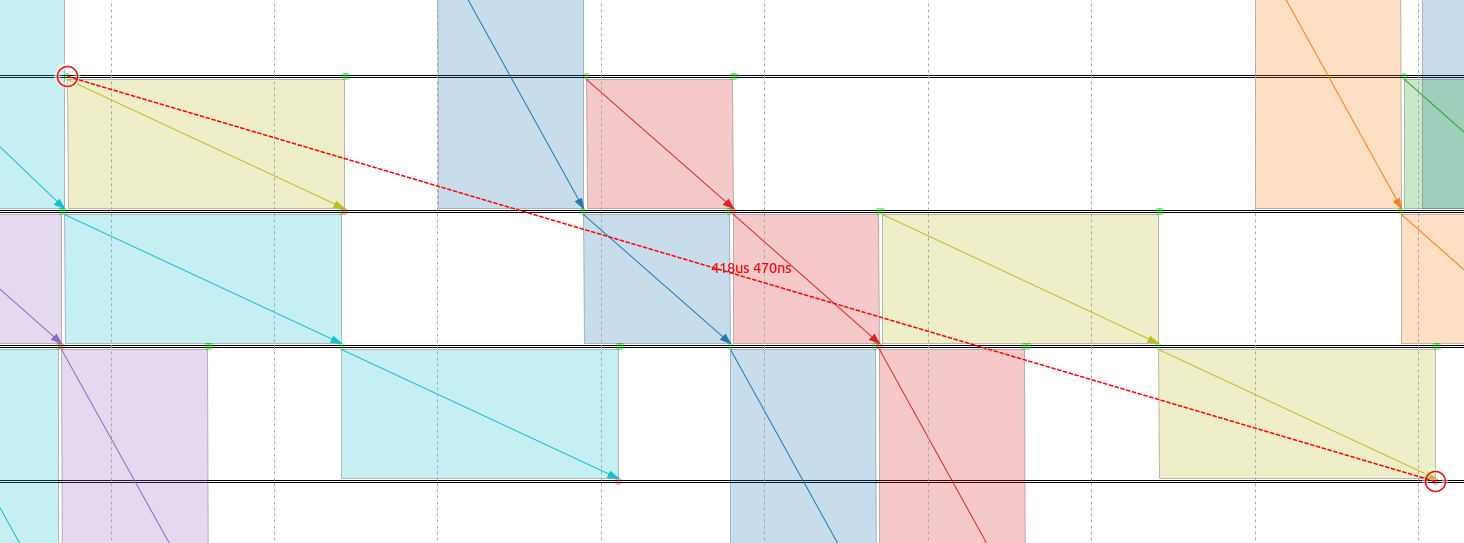
以下是BE类流量中client2的第二个分组从分组源到分组sink的延迟。请注意,此流是上述图表中的异常值。虽然延迟仍在500us要求范围内,但已经非常接近:
不同流量类别的报文延迟情况如下图所示:

所有延迟都在指定的约束范围内。
注意
视频流和client2 尽力而为流都存在两个聚类点。这是因为每个门周期内这些流量类别都有多个数据包。由于不同流之间的相互作用,一些分组的延迟会增加。(图中看似是平行线,但实际是锯齿状折线)
讨论
如果您对这个示例有任何疑问或讨论,请在 此页面 分享您的想法。